Search volume measures opportunity size. It doesn’t measure opportunity quality.
Mudassir Fayyaz, Founder, Tabaruk Commerce
Most sellers approach Amazon SEO with one goal: rank for more keywords.
The brands that grow approach it differently. They rank for the right keywords, the ones where shoppers are ready to buy, the listing can win the sale, and the sale still makes money after fees and ads.
That difference sounds small. In practice, it decides whether organic rank becomes a profit engine or just a vanity metric.
This guide covers both sides. If you’re new to Amazon SEO, you’ll get the foundations: how Amazon search works, what to optimize, and in what order. If you already run a brand, you’ll get the filter we use to decide which keywords deserve your title, your budget and your attention, plus how Rufus, COSMO and Alexa are changing what “optimized” means.
Key takeaways
- Amazon SEO is getting indexed, ranked and chosen for the searches that lead to profitable sales.
- Search volume tells you how big an opportunity is. It doesn’t tell you whether it’s a good one.
- Run every keyword through five filters: Demand, Relevance, Intent, Conversion and Economics.
- Amazon ranks what sells. Keywords get you indexed. Conversion keeps you ranked.
- Rufus, COSMO and Alexa reward listings that clearly explain what the product is, who it’s for and which questions it answers.
What is Amazon SEO?
Amazon SEO is the work of making your products easy to find and easy to choose in Amazon search. It covers three things:
- Getting indexed: Amazon has to connect your product to a search before it can show you for it.
- Getting ranked: among every indexed product, Amazon decides who appears first.
- Getting chosen: once you’re visible, your listing still has to win the click and the sale.
Here’s the part many guides skip. Google ranks pages that answer questions. Amazon ranks products that sell. A shopper on Amazon is usually close to buying, so Amazon’s search is built to show the products most likely to be bought for that search. That’s why Amazon SEO is never just a writing exercise. It’s a relevance and conversion system.
How Amazon search decides who ranks
You don’t need Amazon’s source code to optimize well. You need to understand the three jobs its search is doing.
1. Relevance: is this product about this search?
Amazon reads your title, bullet points, description, back-end search terms, product attributes and category to decide which searches your product is eligible for. If a keyword isn’t connected to your listing, no amount of effort elsewhere will rank you for it.
2. Performance: do shoppers choose it?
Among relevant products, Amazon favors the ones shoppers click and buy for that search. Click-through rate, conversion rate and sales history all feed this. Best Sellers Rank reflects your sales performance, but it’s a result, not a lever you pull directly.
3. Understanding: does Amazon know what the product is for?
This is the newer layer. Amazon now uses AI to understand the intent and context behind a search, not just the words. Its COSMO system connects searches to real-world use cases, Rufus answers shoppers’ questions directly, and Alexa handles voice orders. We’ll cover what that means for your listing further down.
Two more things shape visibility. Sponsored Products can buy you a placement for a search, and the sales they drive can support organic rank. And the Featured Offer (the buy box) decides which offer gets the sale when several sellers list the same product, based on factors like price, delivery speed and seller performance. Rank gets shoppers to your page. The Featured Offer decides who gets paid.
The mistake: optimizing for search volume
Open any keyword tool, sort by search volume, and put the biggest numbers in your title. It’s the most common approach, and it’s the reason so many listings rank for searches that never pay back.
Search volume measures opportunity size. It doesn’t measure opportunity quality.
A broad keyword with huge volume often brings shoppers who are still browsing, comparing unrelated products or looking for something else entirely. You get impressions. You might even get clicks. But conversion stays low, and a low-converting keyword is expensive twice: once in wasted ad spend, and again in the weak sales signal Amazon sees.
Wrong intent wastes clicks. Right intent with bad economics wastes money more quietly.
The keyword filter we use: Demand → Relevance → Intent → Conversion → Economics
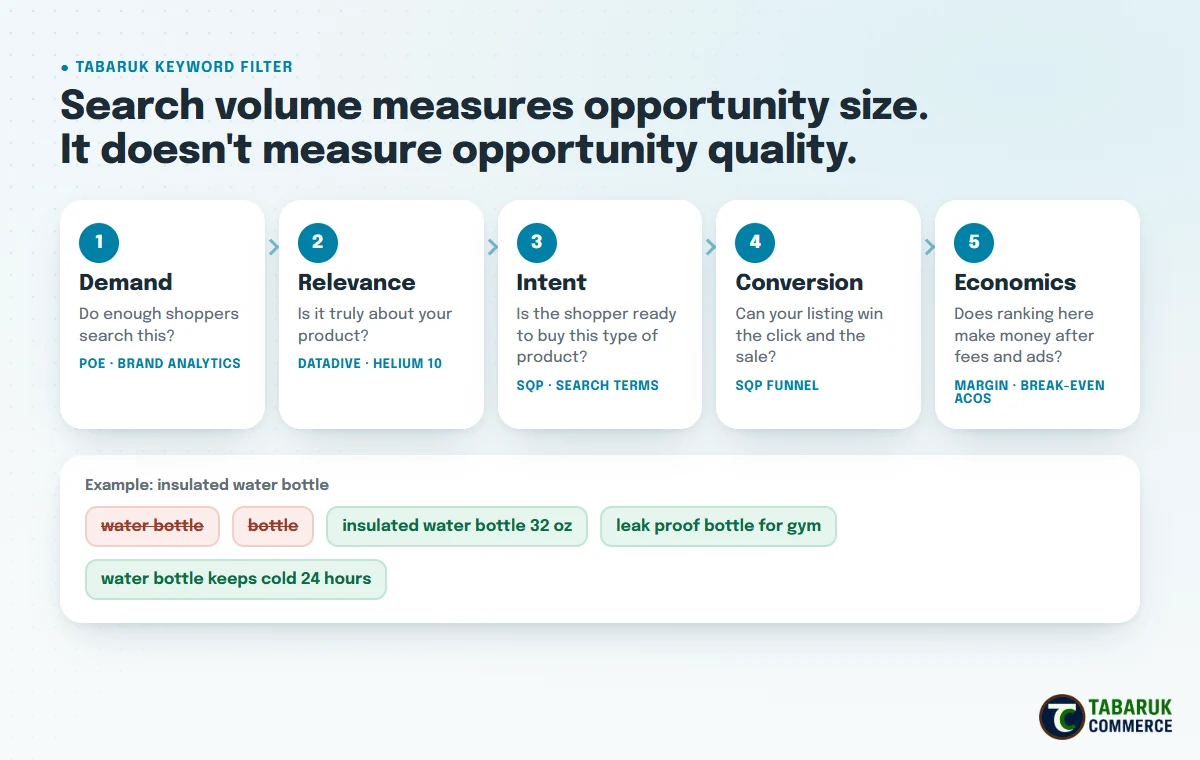
Before a keyword earns a place in a title or a budget, it has to pass five questions, in this order.
- Demand: do enough shoppers search this? We check search frequency in Amazon’s Product Opportunity Explorer and Brand Analytics.
- Relevance: is the search genuinely about your product? A keyword can be popular and still be the wrong product type, size or use case. We use DataDive and Helium 10 to see which terms top competitors actually rank and convert for.
- Intent: is the shopper ready to buy this kind of product, or still exploring? Specific searches (“insulated water bottle 32 oz”) usually carry more intent than broad ones (“water bottle”).
- Conversion: can your listing realistically win the click and the sale against what already ranks? Search Query Performance shows this directly.
- Economics: does ranking here make money after Amazon fees, product cost and the ad spend needed to get there? If you don’t know your break-even ACoS, this step is guesswork.
Most keywords fail somewhere in the middle. That’s the point. The filter isn’t there to find more keywords. It’s there to stop you spending rank, space and budget on the wrong ones.
A practical Amazon SEO process, step by step
Step 1: Build a keyword map, not a keyword list
A list is a spreadsheet of terms. A map tells you which term does which job. Start by collecting keywords from a few sources:
- Brand Analytics (available to brands enrolled in Amazon Brand Registry) for top search terms and which products shoppers click and buy.
- Search Query Performance (SQP) for the searches already bringing impressions, clicks, cart adds and purchases to your own ASINs.
- Product Opportunity Explorer for search volume and the language shoppers use in your niche.
- Helium 10 (Cerebro for competitor keywords, Magnet for keyword ideas) to see what competing listings rank for.
- DataDive to score relevance across the top-ranking competitors, so you’re not guessing which terms truly belong to your product.
Then group what you find: core terms (what the product is), feature and benefit terms, use-case terms, and long-tail variations. Run each group through the five filters.
Step 2: Give every keyword a job
Each part of your listing has a different role. Treat it like a budget.
- Title: your core, highest-intent phrase and the clearest reason to buy.
- Bullet points: benefits, features and use cases, written for shoppers first, with secondary keywords placed naturally.
- Back-end search terms: relevant synonyms, alternate spellings and terms that don’t fit naturally on the page.
- Product attributes: the structured details (size, material, color, use) that Amazon’s filters and AI rely on.
- Description and A+ Content: context, comparisons and the answers shoppers look for before they buy.
Step 3: Make every title character earn its place
Amazon’s move to shorter titles, with a 75-character limit, changed the question from “how many keywords fit?” to “which words deserve to be here?”
When I rebuilt the title of one of Amazon’s top-selling skincare products as a case study, the biggest insight was this: the highest-volume keyword wasn’t the right keyword. Protecting the search phrase that was already driving rankings was worth more than forcing in a bigger one. That’s the difference between rewriting a title and optimizing it.
A strong title today does three jobs in a small space: it keeps the listing searchable for its core phrase, it communicates the strongest buying reason, and it stays compliant. Everything else moves to the item highlights, bullets and back end. We cover the full method in our title optimization system.
Step 4: Write bullet points that answer objections
Bullets are where relevance and conversion meet. Lead each one with the benefit, back it with the feature, and work secondary keywords in where they read naturally. The best bullets answer the questions a shopper would otherwise ask before buying: Will it fit? Will it last? Is it right for my use? Those same answers are what AI shopping tools look for.
Step 5: Use back-end search terms for what the page can’t say
Back-end search terms are invisible to shoppers but read by Amazon. Use them for relevant synonyms, alternate spellings and related terms that would clutter the page. Amazon limits this field (in the US, to fewer than 250 bytes), so don’t repeat words already in your title, and don’t include competitor brand names or irrelevant terms. Wasted space here is relevance you never get back.
Step 6: Fix attributes and category before you blame keywords
Incomplete attributes and the wrong category quietly limit where your product can appear, especially in filtered searches. They’re also one of the most overlooked fixes.
In one account, the product already looked strong: a 4.5-star rating, 657 reviews and a #2 rank in its niche. But it captured only about 6% of category revenue. The problem wasn’t the product or the demand. It was positioning and visibility. We corrected a catalog classification issue, repositioned the title and bullets around the category’s own language, and realigned keywords against the competitive landscape. The full breakdown is below.
Step 7: Treat images, A+ Content and price as ranking inputs
Images, A+ Content and price don’t carry keywords, but they drive click-through and conversion, which is exactly what keeps you ranked. A listing that ranks but doesn’t convert slowly loses the position it earned. And if your price is out of line with what shoppers expect for that search, you’ll struggle to hold both rank and the Featured Offer. Keepa’s price and sales-rank history is a quick way to see how price changes have affected your rank and your competitors’.
Step 8: Check that you’re actually indexed
Writing a keyword into your listing doesn’t guarantee Amazon connects it to your product. After changes go live, check that your priority keywords are indexed, either by searching your ASIN together with the keyword on Amazon, or with a tool like Helium 10’s Index Checker. A keyword you’re not indexed for is a keyword you can’t rank for, however good the rest of the listing is.
Step 9: Track rank, share of voice and the SQP funnel
Once you’re indexed, track organic rank for your priority keywords and your share of voice against competitors. Then use Search Query Performance to see where you lose shoppers for each search:
- Low impression share: a relevance or visibility problem. Revisit indexing, keywords and category.
- Impressions but low click share: your main image, title, price or reviews aren’t winning the click.
- Clicks but low purchase share: the listing or the offer isn’t closing the sale.
This is where Amazon SEO stops being guesswork. Each stage of the funnel points to a different fix.
Optimizing for Rufus, COSMO and Alexa
Amazon search is moving from matching words to understanding needs. Shoppers ask Rufus questions like “which bottle keeps drinks cold on a long hike?” COSMO connects searches to intent and use cases. Alexa takes short, spoken requests. None of them reward keyword stuffing. All of them reward clarity.
- Describe use cases, not just features. Say who the product is for and when they’d use it.
- Answer real questions in your content. Use your reviews, returns feedback and competitor reviews to find the questions shoppers keep asking, then answer them in bullets and A+ Content.
- Complete your attributes. Structured details help AI match your product to specific requests.
- Keep the title clean and specific. Voice requests are short. A clear product name matched to how people say it out loud helps.
- Protect your reviews and ratings. AI shopping tools read what customers say, not just what you say.
The practical test: if someone read only your listing, could they explain what the product is, who it’s for and why it’s better? If not, neither can Amazon’s AI.
For the hands-on version, including how to collect and score every Rufus question on your page, see how to optimize an Amazon listing for Rufus.
Where PPC fits into Amazon SEO
Advertising and organic rank aren’t separate worlds. Sponsored Products can put a new or under-ranked product in front of high-intent searches, and the sales it drives can support organic rank on those same terms.
But PPC can create momentum. Durability comes from the system underneath it. If the keyword is wrong, the listing doesn’t convert or the economics don’t work, ads just make the problem more expensive. Fix relevance and conversion first, then use PPC to accelerate what already works.
Case study: earning the Best Seller badge without more ad spend
Back to that account from Step 6. Before touching anything, we stacked five data sources: Search Query Performance, PPC data, competitive intelligence, niche analysis and keyword research.
- SQP showed the listing getting impressions from broad, low-intent searches, while higher-intent category terms converted strongly but had limited visibility.
- The product already had strong organic visibility, with 91% of tracked keywords on page 1. But the category leader controlled about 57% of top-of-search visibility.
- More search volume wasn’t automatically better. The opportunity was aligning with the searches that matched buyer intent.
So we fixed the foundation: the catalog classification, the title and bullets positioned around category language, and keyword alignment against competitors. The results over 30 days:
- Units: 76 → 203 (+167%)
- Revenue: $4,722 → $12,355 (+162%)
- Conversion rate: 2.63% → 4.57%
- Best Sellers Rank: #9,289 → #2,759
- Niche rank: #2 → #1 Best Seller
No additional ad spend. Not because PPC doesn’t matter, but because the economics of turning it back on improved once the product was positioned correctly. Read the full case study.
Amazon SEO checklist
- Keywords collected from Brand Analytics, SQP, Product Opportunity Explorer, Helium 10 and DataDive
- Every keyword run through Demand, Relevance, Intent, Conversion and Economics
- Each keyword assigned a job: title, bullets, back end, attributes or A+ Content
- Title rebuilt so every character earns its place
- Bullets that lead with benefits and answer buying objections
- Back-end search terms used for synonyms and variants, with no repeats
- Attributes complete and category correct
- Images, A+ Content and price reviewed as conversion inputs
- Priority keywords checked for indexing
- Organic rank, share of voice and the SQP funnel tracked after every change
- Content written to answer the questions Rufus and shoppers ask
Amazon SEO FAQs
How can I improve my Amazon ranking?
Start with relevance: make sure your listing targets the right keywords and is indexed for them. Then improve the things that drive click-through and conversion, such as your main image, title, price, bullets and reviews. Amazon keeps ranking the products shoppers choose.
Does Amazon have its own keyword research tools?
Yes. Product Opportunity Explorer shows search volume and trends by niche. Brand-registered sellers also get Brand Analytics and Search Query Performance, which show top search terms and how your own products perform for each search.
How can I find my competitors’ keywords?
Reverse-ASIN tools like Helium 10’s Cerebro show which searches a competing product ranks for. Brand Analytics also shows which products shoppers click and buy for top search terms. DataDive helps you see which of those terms are truly relevant across the top competitors.
How do I see how often a keyword is searched on Amazon?
Product Opportunity Explorer and Brand Analytics show search frequency from Amazon’s own data. Third-party tools like Helium 10 estimate search volume too. Use volume to size an opportunity, then use the other four filters to judge whether it’s worth pursuing.
Do back-end search terms still matter?
Yes. They’re one of the few places you can add relevant synonyms and variants without cluttering what shoppers see. They matter more now that titles are shorter.
How is Amazon SEO changing with Rufus and AI?
Search is shifting from matching words to understanding intent. Listings that clearly explain use cases, answer common questions and have complete attributes are easier for Rufus, COSMO and Alexa to recommend.
How long does Amazon SEO take to work?
It depends on your category, competition and how far your listing is from where it needs to be. Indexing changes can show up quickly. Rank changes depend on sales performance over time. That’s why we track indexing, rank and SQP after every change instead of guessing.
Want a second set of eyes on your Amazon SEO?
We apply this exact process in our Amazon SEO services: keyword mapping, indexing checks, optimization for Rufus, COSMO and Alexa, and rank and share-of-voice tracking. If you’d like to know where your listings are losing search visibility right now, request a free Amazon account audit.
Diagnose first. Reposition second. Scale third.

Mudassir Fayyaz is the founder of Tabaruk Commerce and an Amazon growth strategist. He manages 1P and 3P Amazon accounts across the US, Canada, UK, Germany, UAE, and Australia, with a focus on turning ad spend into net profit. Connect on LinkedIn.